
|
Field/Button |
Status |
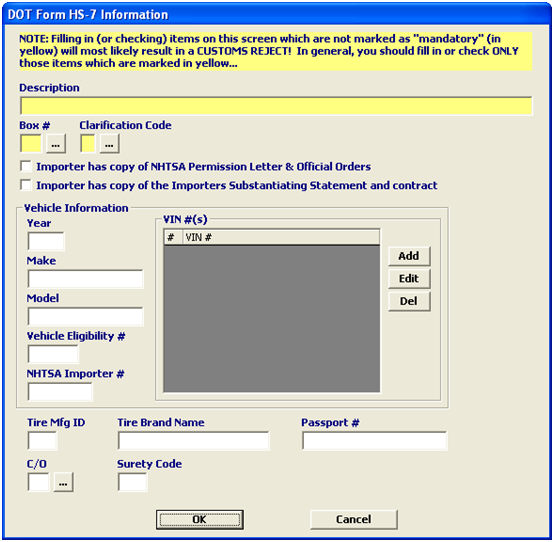
Description |
|
Description |
Mandatory |
Enter the description of the goods. |
|
Box # |
Mandatory |
Enter the box number, or choose from the pick-list by clicking the ellipsis. This number indicates the product condition in terms of compliance with DOT. |
|
Clarification Code |
Mandatory |
Enter the code identifying the merchandise being imported, or choose from the pick-list by clicking the ellipsis. |
|
Importer Checkboxes |
Conditional |
Check the appropriate boxes to indicate that the importer has copies of the documents. These documents may be required depending on the entered box #. |
|
Year |
Conditional |
Enter the year that the vehicle was manufactured. |
|
Make |
Conditional |
Enter the name of the company that manufactured the vehicle. |
|
Model |
Conditional |
Enter the name/model of the vehicle that was manufactured. |
|
Vehicle Eligibility # |
Conditional |
Enter the NHTSA number corresponding to the year, make, and model of every non-conforming vehicle. This is required for box #3. |
|
NHTSA Importer # |
Conditional |
Enter the code assigned to the company making the non-conforming vehicle modification. This is also known as the registered importer code. |
|
Add |
Button |
Click to add a new vehicle identification number (VIN). This will open a new VIN screen. |
|
Edit |
Button |
Click to edit the selected vehicle identification number (VIN). This will open the selected item in the VIN screen. |
|
Del |
Button |
Click to delete the selected VIN. |
|
Tire Mfg. ID |
Conditional |
Enter the tire manufacturer ID code, if necessary. |
|
Tire Brand Name |
Conditional |
Enter the tire brand name. This is required for box #3, 7, 8, or 9. |
|
Passport # |
Conditional |
Enter the passport number of the person importing the vehicle, if applicable. |
|
C/O |
Conditional |
Enter the ISO code for the country of origin, or choose from the pick-list by clicking the ellipsis. |
|
Surety Code |
Conditional |
Enter the assigned DOT bond number, if applicable. |
|
OK/Cancel |
Buttons |
OK will save the DOT Information. Cancel will cancel and go back to the OGA screen without saving. |